· Design My Website · WordPress · 3 min read
Why Pingbacks and Trackbacks Are Disabled on Modern WordPress Websites
What pingbacks and trackbacks are, why this old WordPress feature now mostly attracts spam, and why we turn it off by default on every client site we build.
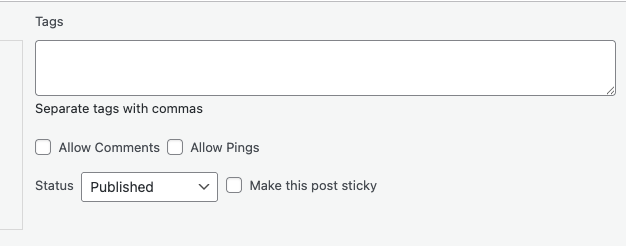
I was recently working on a website for a client and they were asking me about Pingbacks on WordPress and why they were disabled for all their posts.
If you’ve ever edited a page or post in WordPress, you may have spotted a setting called “Allow trackbacks and pingbacks” and wondered what it actually does, or whether it should be turned on at all.
It’s one of those options that has been around forever, rarely explained, and often left enabled by default. On the websites we build, it’s something we intentionally turn off. Here’s why.
What Are Pingbacks and Trackbacks?
Pingbacks and trackbacks are an old WordPress feature that dates back to the early days of blogging.
They were originally designed to notify a website when another site linked to it. If another blog mentioned your article, WordPress could display that mention as a comment on your post. At the time, this helped blogs interact with each other and show connections between related content.
That idea made sense years ago, before social media, analytics platforms, and modern SEO tools existed.
Why They’re No Longer Needed
While the feature still exists, it hasn’t aged particularly well.
They attract spam
Most pingbacks today aren’t genuine mentions from real websites. They’re automated spam links trying to appear legitimate. Leaving pingbacks enabled often results in a steady stream of low-quality or suspicious notifications that need to be manually filtered or deleted.
They don’t improve SEO
Pingbacks don’t help your website rank higher on Google. Search engines don’t treat them as meaningful backlinks, so there’s no SEO advantage to keeping them enabled.
They add clutter, not value
From a visitor’s point of view, automated link notifications don’t add anything useful to a page. They’re not real comments, they don’t start conversations, and they don’t provide insight.
They’re irrelevant for business websites
For most modern business websites, especially service-based or informational sites, pingbacks serve no practical purpose. Pages like Services, About, News, or Communications don’t benefit from them in any way.
Better tools already exist
If you want to see which websites are linking to yours, tools like Google Search Console and SEO platforms provide accurate, detailed information without cluttering your website with automated comments.
Why We Disable Pingbacks by Default
As part of our standard WordPress setup, we disable pingbacks and trackbacks across client websites.
Doing this helps to:
- Reduce spam and unnecessary moderation
- Keep comment sections clean and intentional
- Improve overall site security
- Remove outdated features that no longer serve a purpose
- Make the website easier to manage long-term
It’s a small setting, but it’s one of many that contribute to a cleaner, more professional website.
Does Disabling Pingbacks Affect Your Website?
No. Turning off pingbacks doesn’t stop people from linking to your website, sharing your content, or finding you online. It simply removes a legacy feature that most modern websites no longer use.
Your site continues to function exactly the same, just with less noise in the background.
About the author
Tommy O'Shea
Tommy owns and runs Design My Website, a web design studio in Kilcummin, Co. Kerry. He has built and maintained over 100 websites for businesses across Kerry, Cork and Ireland over the last 13 years.